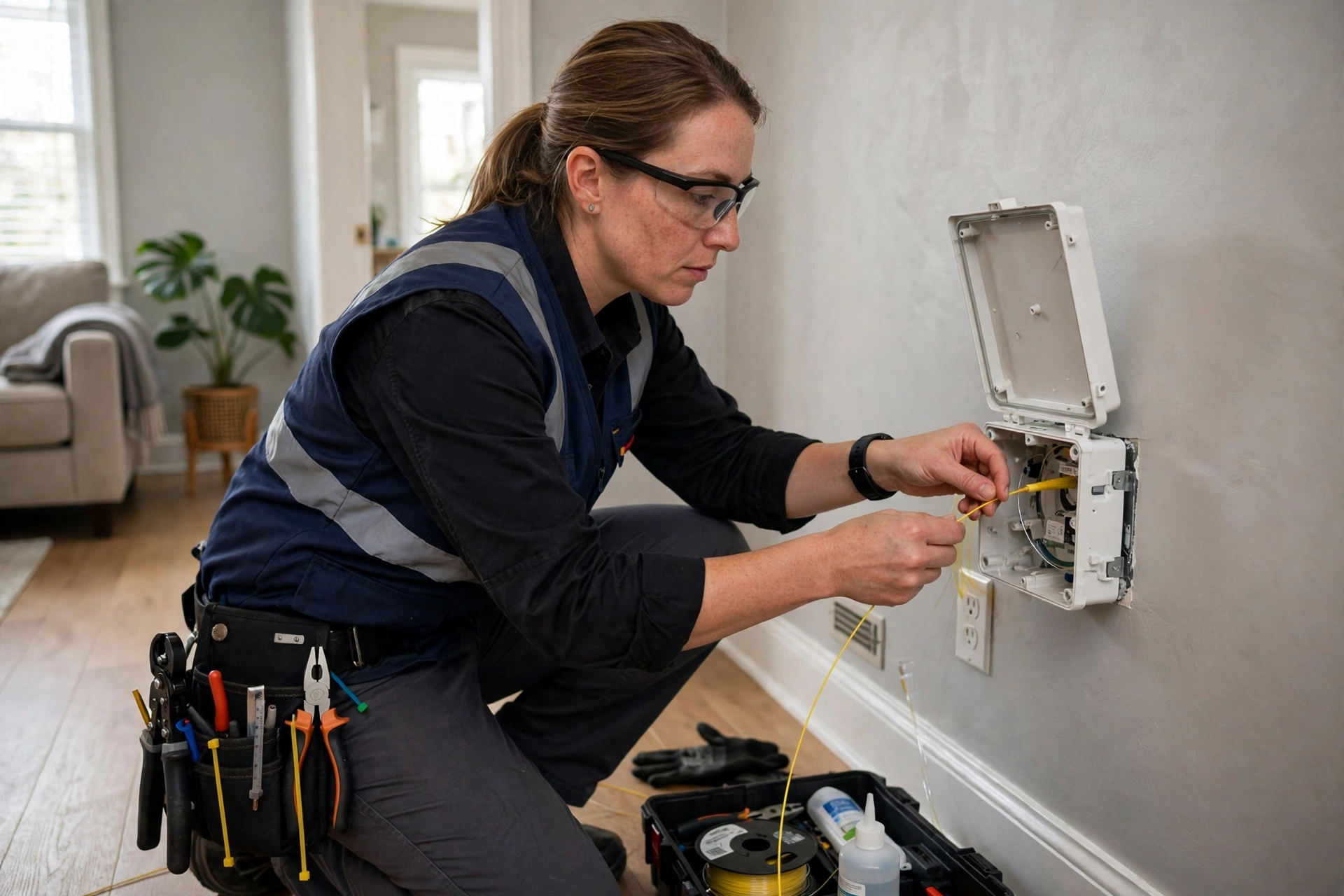
Home Fiber Internet Installation: 2026 Guide
Key takeaways
- The provider's job ends at the ONT; your in-home distribution (not the speed tier) determines whether fiber feels fast.
- Place the ONT centrally near your networking core; negotiate placement or plan an Ethernet run before the install appointment.
- Wire stationary devices with Ethernet ($150-$400/drop); use MoCA over existing coax where new runs aren't possible.
- Use wired access points or wired-backhaul mesh for Wi-Fi; a single router can't properly cover a large home.
- Future-proof cheaply: Cat6A drops, conduit in open walls, a PoE switch, and spare rack ports absorb every coming upgrade.
Fiber internet is finally reaching millions of American homes — but the fiber stops at your wall, and what happens inside is entirely up to you. The difference between a mediocre fiber experience and a spectacular one is almost never the provider's speed tier; it is the in-home installation: where the ONT (the fiber modem) lives, how the signal gets from that box to your office, your TV, and your Wi-Fi access points, and whether your home's wiring is helping or strangling the gigabit connection you are paying for. A proper in-home fiber distribution setup costs $800 to $3,500 in 2026 depending on how much wiring your home needs — and it is the foundation every other smart-home upgrade stands on.
How Fiber Reaches Your Home: The Parts You Need to Understand
Fiber internet arrives as a hair-thin glass strand carrying light, not electricity, which is why it delivers symmetrical gigabit-plus speeds immune to the distance and interference limits of cable and DSL. The provider runs fiber to an exterior box (the NID or fiber terminal) on your home, then inside to the ONT — the optical network terminal, essentially the fiber modem — which converts light to the Ethernet signal your router uses. The provider's responsibility typically ends at the ONT; everything downstream — router placement, in-home wiring, Wi-Fi coverage — is yours to get right, and it is where most fiber installations underperform.
Three in-home realities surprise new fiber subscribers. First, the ONT needs power and a sensible location: providers often default to the garage, a utility closet, or wherever the fiber enters, which is frequently the worst spot in the house for your router and Wi-Fi. Second, fiber's speed is only as good as the weakest link downstream — an old router, a single Wi-Fi access point trying to cover 3,000 square feet, or a 100-megabit Ethernet bottleneck somewhere in the chain will cap your gigabit plan at a fraction of its speed. Third, the installation appointment is your one leverage point: the technician is already there with tools and access, so every in-home decision should be made before they arrive, not during.
Before the install, confirm three things with your provider: which speed tier you are actually buying (and whether it is symmetrical), whether the ONT they supply includes a router or is ONT-only (ONT-only is better — it lets you use your own networking gear), and where they plan to place the ONT. If their default location is bad, negotiate the placement or plan your own wiring from that point. Knowing the ONT location in advance lets you pre-wire or at least pre-plan the distribution that follows. Costs are 2026 US market ranges; get itemized local quotes.
Kasa Smart Plug with Energy Monitoring (EP25 4-Pack)

Automates scheduling and tracks electricity draw on individual plugs
*Affiliate Disclosure: As an Amazon Associate, Elevate Home earns from qualifying purchases. Pricing and availability subject to change.
ONT Placement: The Decision That Shapes Everything
ONT placement is the single most consequential decision in a fiber installation, and providers optimize for their convenience — shortest fiber run, easiest access — not your network performance. The ideal ONT location is central, climate-controlled, powered, and adjacent to your networking core: a home office closet, a utility room with your network rack, or a structured-wiring panel location. What you want to avoid is the ONT stranded in a garage corner or an exterior wall with no path for Ethernet to reach the rest of the house.
If the provider's entry point is fixed — say, fiber enters at the garage — you have two good options. Option one: accept the ONT in the garage and run Ethernet from there to a central networking location; a single well-placed Ethernet run solves the problem for $150 to $400 professionally installed. Option two: ask the technician to run the interior fiber to your preferred location during the install appointment; many will do a reasonable interior run at no or modest charge if you ask before they start, since they have the fiber, the tools, and the time allocated. Decide which you want before the truck arrives.
Power and environment matter more than people expect: the ONT needs a standard outlet and prefers a clean, dry, temperate location — not a sweltering attic or a damp crawlspace. If you are placing network gear alongside it, plan for a small UPS battery backup ($80 to $200) so a brief power blip does not drop your internet, phones, and security cameras simultaneously. And leave service slack: a loop of extra fiber and labeled cables at the ONT location makes future upgrades and troubleshooting dramatically easier.
In-Home Distribution: Ethernet, MoCA, and the Right Wi-Fi
Here is the hierarchy of in-home distribution, ranked by performance: wired Ethernet first, then MoCA over existing coax, then mesh Wi-Fi, then a single router's Wi-Fi hoping for the best. Nothing beats a wired Ethernet run — full speed, near-zero latency, immune to interference — and every stationary high-value device (desktop, TV, game console, work computer, smart-home hub) should be wired if at all possible. Professionally installed Ethernet runs cost $150 to $400 per drop in 2026, and a strategic four-to-six-drop installation ($800 to $2,000) transforms a home's network more than any router upgrade ever will.
For homes with existing coaxial cable (nearly every home built before streaming), MoCA adapters are the secret weapon: they deliver near-gigabit speeds over coax without new wiring, at $150 to $250 for a pair of adapters. If your home has coax to the rooms that matter and you cannot or will not run Ethernet, MoCA is the retrofit answer that actually works — far more reliable than powerline adapters, which are at the mercy of your electrical panel's whims. Use MoCA to backhaul mesh Wi-Fi nodes or feed a distant office, and you get wired-class performance without opening walls.
Wi-Fi itself should be the last mile, not the backbone. A single all-in-one router cannot properly cover a large or multi-story home; the 2026 answer is two to four wired access points (or a wired-backhaul mesh system) placed for coverage, with the router's own Wi-Fi often disabled in favor of the dedicated access points. Budget $400 to $1,200 for a proper multi-access-point Wi-Fi system. And when you test speeds, test wired first: if wired hits your plan speed but Wi-Fi does not, the problem is Wi-Fi placement and density, not your fiber — a distinction that saves many pointless provider support calls.
The Network Closet: Racks, Switches, and Doing It Properly
Every serious home network converges in one place — the network closet, rack, or structured-wiring panel — and fiber is the reason to finally build it properly. The core components: a small wall-mount or floor rack ($100 to $400), a managed or smart-managed switch with enough ports for every drop plus headroom ($100 to $300 for 16-24 ports), a patch panel that terminates your in-home runs cleanly ($50 to $150), the UPS mentioned earlier, and cable management that keeps it serviceable. Total for a proper closet build: $400 to $1,200 in gear plus installation labor.
The details that separate professional closets from cable spaghetti: every cable labeled at both ends, a simple network diagram taped inside the closet door, the switch and patch panel mounted with ventilation clearance, and power strips (not daisy-chained) on the UPS. PoE (Power over Ethernet) deserves special attention in 2026: a PoE switch powers your access points, cameras, and doorbells over the same Ethernet cable that carries data, eliminating a tangle of wall warts and giving you remote power-cycling of hung devices — worth the modest premium on the switch.
Ventilation and noise are the practical constraints: network gear generates heat and some switches have fans, so a sealed closet needs ventilation planning and a bedroom-adjacent location needs a fanless switch. A licensed low-voltage contractor can build the closet, terminate the runs, and certify every drop — expect $800 to $2,500 in labor depending on drop count and difficulty — and the result is infrastructure that serves every future upgrade (faster fiber tiers, more cameras, more access points) without being touched again.
Working With the Installer and What to Watch For
The provider's installation appointment is a scheduled window of skilled labor you are not paying for directly — use it fully. Before the tech arrives: decide your ONT location preference, clear access to the entry point and the interior path, have your router and any gear on hand (do not let the install stall waiting for an Amazon delivery), and know your Wi-Fi network name and password plan so the tech can confirm the basics working before leaving. During the visit: walk the fiber path with the tech, confirm the ONT location, ask for the install to be tested at the ONT with their meter (this establishes the provider's speed baseline), and get the tech's direct notes on the work order.
Watch for the common shortcuts: ONT placed for tech convenience rather than your network plan, interior fiber run stapled across a visible wall when a cleaner path existed, no service slack left for future work, and the tech's all-in-one gateway left as your router when you planned to use your own gear. None of these are malice — they are a busy tech optimizing a full day's route — but each one costs you later. Polite, specific requests before work starts (“could we run the fiber along this path to the office closet?”) get better results than complaints after.
After the tech leaves, verify methodically: speed test wired directly at the ONT (this is your provider baseline), then at each Ethernet drop, then via Wi-Fi in each major room. Document the results with dates — this record is your leverage if speeds degrade later, because it separates provider problems from in-home problems instantly. Keep the provider's gateway in bridge or passthrough mode if you use your own router; double-NAT from two competing routers is the most common self-inflicted fiber performance problem.
Costs, Timelines, and Future-Proofing
Total project costs in 2026: a basic professional setup — ONT placement optimization, four to six Ethernet drops, and a two-to-three-node wired-backhaul Wi-Fi system — runs $1,500 to $3,500 installed. A comprehensive build with a proper rack closet, PoE switch, eight-plus drops, and four access points runs $3,500 to $7,000. DIYers with attic or basement access can cut labor substantially, but fiber handling itself (anything involving the glass strand) should be left to the provider's tech — Ethernet and rack work is the safe DIY zone, fiber is not.
Timeline: the provider install itself is typically a half-day appointment scheduled one to three weeks out. In-home wiring is best done before the fiber appointment (so the tech lands on a ready home) or scheduled as a separate low-voltage contractor visit; a typical drop installation takes a few hours for an experienced two-person crew. If you are mid-renovation, run conduit and pull strings to every room now — it costs almost nothing during open walls and saves thousands later.
Future-proofing is cheap at the margin: run Cat6A rather than Cat5e for new drops (the cost difference is small, the headroom is a decade), install conduit wherever walls are open, leave two spare drops at the rack for growth, and choose a switch with more ports than you need today. Fiber tiers keep climbing — multi-gigabit residential plans are increasingly common in 2026 — and a well-built in-home distribution system absorbs every upgrade without being rebuilt. Build the plumbing once, upgrade the endpoints forever. Costs are 2026 US market ranges; get itemized local quotes, and use licensed low-voltage professionals for in-wall wiring.
Frequently asked questions
Where should the fiber ONT be placed in my home?
Centrally, near your networking core: a home-office closet, utility room with a network rack, or structured-wiring panel location, with power and climate control. Avoid provider-default spots like garage corners with no path for Ethernet onward. Ask the technician to run interior fiber to your preferred location during the install, or plan a single Ethernet run ($150-$400) from the ONT to your central point.
How much does in-home fiber distribution cost?
A basic professional setup (ONT placement, 4-6 Ethernet drops, 2-3 node wired-backhaul Wi-Fi) runs $1,500-$3,500 installed in 2026. A comprehensive build with a rack closet, PoE switch, 8+ drops, and 4 access points runs $3,500-$7,000. Individual Ethernet drops cost $150-$400 each professionally installed.
Do I need Ethernet if I have gigabit fiber?
For the full benefit, yes for stationary devices. Fiber speed is capped by the weakest downstream link: an old router, a single distant access point, or a 100-megabit bottleneck will throttle your gigabit plan. Wire desktops, TVs, consoles, and work computers with Ethernet, use MoCA adapters ($150-$250/pair) over existing coax where you can't run cable, and reserve Wi-Fi as the last mile.
What is MoCA and should I use it?
MoCA (Multimedia over Coax Alliance) adapters deliver near-gigabit speeds over your home's existing coaxial cable without new wiring, at $150-$250 for a pair. It's the best retrofit option for homes with coax to the rooms that matter, far more reliable than powerline adapters. Use it to backhaul mesh Wi-Fi nodes or feed a distant office.
Should I use my provider's router or my own?
Your own, in almost all cases. Provider gateways are adequate but rarely excellent; put the provider's gateway in bridge/passthrough mode and run your own router plus wired access points. Double-NAT from two competing routers is the most common self-inflicted fiber performance problem, so confirm bridge mode is actually active after setup.
How do I future-proof my home network for faster fiber?
Run Cat6A (not Cat5e) for new drops, install conduit wherever walls are open, leave spare drops and extra switch ports at the rack, and choose a PoE switch to power access points and cameras over Ethernet. Multi-gigabit residential tiers are increasingly common; a well-built distribution system absorbs every upgrade without being rebuilt.
Keep reading
Network & WiFi
Home Network Rack Build Guide: 2026
Home network rack setup guide for 2026: sizing, patch panels, managed PoE switch and UPS selection, cable labe…

New Construction
Smart Home Prewire Guide: New Builds 2026
Smart home prewire new construction guide 2026: full Cat6A, speaker, camera, and conduit plan, builder negotia…
Security & Cameras
PoE Camera Wiring Guide for Homes: 2026
PoE camera wiring home guide: Cat6 home runs, PoE switch power-budget sizing, mounting heights, plus 2026 inst…

Retrofit
Retrofit Smart Home Without Rewiring: 2026
Smart home without rewiring retrofit guide 2026: RadioRA 3 wireless lighting, battery shades, sensors, room-by…

Transfer Equipment
100A vs 200A Automatic Transfer Switch
100 amp vs 200 amp transfer switch: service-entrance vs subpanel topology, when each is required, costs, and l…

Pillar 01 · Energy Resilience
10kWh vs 13.5kWh vs 20kWh Home Battery: Which Size Is Right? (2026)
10kWh vs 13.5kWh vs 20kWh home battery compared: usable capacity, backup runtime, solar pairing, and which tie…