What Can a Home Battery Power? Sizing by Load — Office, Medical, Pool, Sump, Well Pump & More (2026)
Key takeaways
- Two numbers decide every load: running watts set the continuous draw, surge watts (locked-rotor amps on motors) decide whether it starts at all — and usable kWh divided by watts gives the hours.
- Electronics are the easy loads: a laptop office (~150W) runs ~28 hours on 5 kWh, a CPAP uses just 0.8 kWh overnight, and a 250W server rack needs ~7 kWh for 24 hours.
- Motors size the inverter first: a 1/2 HP sump pump surges to 2,150–4,100W, an AC compressor's LRA is often 3–5× its running draw, and an elevator motor draws 3–6× its running current at startup.
- Continuous heavy loads size the battery: an oxygen concentrator (300–600W) uses ~9.6 kWh/day at 400W, while a single-speed pool pump burns 12–20 kWh in 8 hours — a variable-speed pump at low speed uses just 0.8–2.4 kWh for the same 8 hours.
- Duty cycle stretches runtime: a sump pump cycling at 20% averages ~160W (~3.8 kWh/day), and a healthy pressure tank can keep a well pump from starting at all for hours.
- Transfer-sensitive loads need a UPS layer even with a home battery: medical devices (with 25–30% sizing margin) and servers (15–20% margin, graceful shutdown with 10–15 minutes of UPS reserve) cannot tolerate the battery's switchover gap.
A home battery can power almost any single load in your house — the real question is whether it can start that load and how many hours it can keep it running. Two numbers decide both answers for every load: running watts (the steady draw once a load is going) versus surge watts (the split-second startup spike motors demand), and kilowatt-hours, because usable kWh divided by load watts equals hours of runtime. Electronics — a home office, a server rack, a CPAP — are easy, low-watt, all-day loads. Motors — sump pumps, well pumps, air conditioners, elevators — are surge loads that size your inverter first and your battery second. This hub works through all ten load-specific cases in one place: home office, medical devices, pool equipment, sump pump, well pump, air conditioner, home servers, elevator and stairlift, an ADU or guest house, and a home addition.
Every wattage, surge figure, and runtime example below comes from Elevate Home Guide’s load-specific guides for those ten use cases. Where a source gives a range, this hub keeps the range. Where a source gives no number at all — well pumps are the important case — this hub says so and tells you where the real number lives: on your equipment’s nameplate. Nothing here replaces a licensed electrician’s load calculation, but it will let you walk into that conversation knowing which loads are trivial, which are expensive, and which are the ones that actually size your system.
How to size any load in 3 steps
Step 1 — Find two wattages, not one. Every load has a running draw: the watts it consumes while operating. Motor loads have a second, larger figure: the startup surge, the brief burst needed to get a motor turning from a dead stop. The sources put that surge at 2 to 3 times running watts for sump pumps, often three to five times running current (locked-rotor amps, or LRA) for an air conditioner compressor, and 3 to 6 times running current for an elevator motor. A well pump’s surge is several times its running draw. Your battery system therefore has two power ratings to check: its continuous output (kW) must cover the running watts of everything operating at once, and its surge rating must clear the largest startup spike plus whatever else is running when that motor kicks on. Size for running watts alone and an undersized inverter faults at the first startup — the single most common sizing mistake across all ten guides.
Step 2 — Turn watts into hours with the duty cycle. The energy math is simple: watts × hours ÷ 1000 = kilowatt-hours. Usable battery Wh divided by load W equals hours of runtime, derated by about 10–15 percent for inverter and conversion losses. The catch is the duty cycle — how much of the time the load actually runs. A sump pump cycling 20 percent of the time averages a fraction of its nameplate draw, and an air conditioner compressor rests once the house reaches setpoint, while an oxygen concentrator, a server rack, and an office run continuously with no duty cycle to hide behind. Then add the margin your load class demands: the medical guide adds 25–30 percent on top of the calculated need, because the consequence of coming up short is not inconvenience; the server guide adds 15–20 percent for inverter losses and battery aging.
Step 3 — Check the transfer, then pick the architecture. A home battery’s switchover is fast — a fraction of a second to a few seconds in the home-office guide’s terms, milliseconds to a few cycles in the server guide’s — but loads that cannot tolerate a blip still need an uninterruptible power supply (UPS) at the load: the UPS bridges the gap seamlessly, conditions power, and, for servers and medical devices, provides the signaling and reserve that a battery alone cannot. With the load’s watts, surge, hours, and transfer needs known, the architecture follows: a dedicated small solution for a single small load, or the whole-home battery’s backed-up critical-loads panel for the loads that must run together. The ten sections below apply these three steps load by load, and the full sizing guide walks through the whole-house version of the same math.
Home office: the easiest full workday on the list
Start with the measured load, not a guess. A realistic one-person office breaks down as: laptop (30–90W while charging and working), external monitor (20–40W), a second monitor (another 20–40W), router, modem, and switch (15–30W combined), desk lighting (10W LED), and phone chargers (10–20W) — roughly 100 to 250 watts total. Swap the laptop for a desktop workstation and the range climbs to 300–500W or more. Two loads wreck estimates: a laser printer, which spikes to 500W or more only while printing, and a space heater at 1,000–1,500W, which draws more than the entire rest of the office combined.
The runtime formula is usable battery Wh divided by load W, derated about 10–15 percent for inverter and conversion losses. The office guide’s worked examples: a laptop office at roughly 150W runs about 28 hours on a small home battery of about 5 kWh, and multi-day on a large 13.5 kWh battery; a desktop office at roughly 400W runs about 11 hours on 5 kWh and about 30 hours on 13.5 kWh; a full circuit-level load of about 800W (office plus lights plus refrigerator) runs about 5–6 hours on 5 kWh and about 15 hours on 13.5 kWh. The lesson is that the laptop-based office is dramatically easier to back up than the desktop one, and heating and cooling dominate everything — in a winter outage, heat the person rather than the room, or size explicitly for the heater.
The transfer note matters as much as the hours. A UPS provides instant, seamless switchover — zero milliseconds of interruption — and a typical 1000–1500 VA unit carries a laptop, monitor, router, and peripherals for roughly 15 minutes to an hour: long enough to ride through the blips and short outages and to shut down gracefully. A home battery, by contrast, has a switchover gap of typically a fraction of a second to a few seconds, which can reboot sensitive equipment. The two are complements, not competitors: keep the UPS at the desk to cover the gap, and let the battery provide duration. Finally, the honest limitation: a battery fixes only the power half of remote work. Cable and fiber internet depend on powered ISP equipment beyond your house, so keep network gear on the UPS and plan cellular failover for wide-area outages. On the backed-up panel, include office outlets, network equipment, desk and room lighting, the refrigerator, and the furnace blower for gas heat; exclude the electric water heater, central AC, electric dryer, and EV charger unless you have sized for them.
Medical devices: size for the care plan, with margin
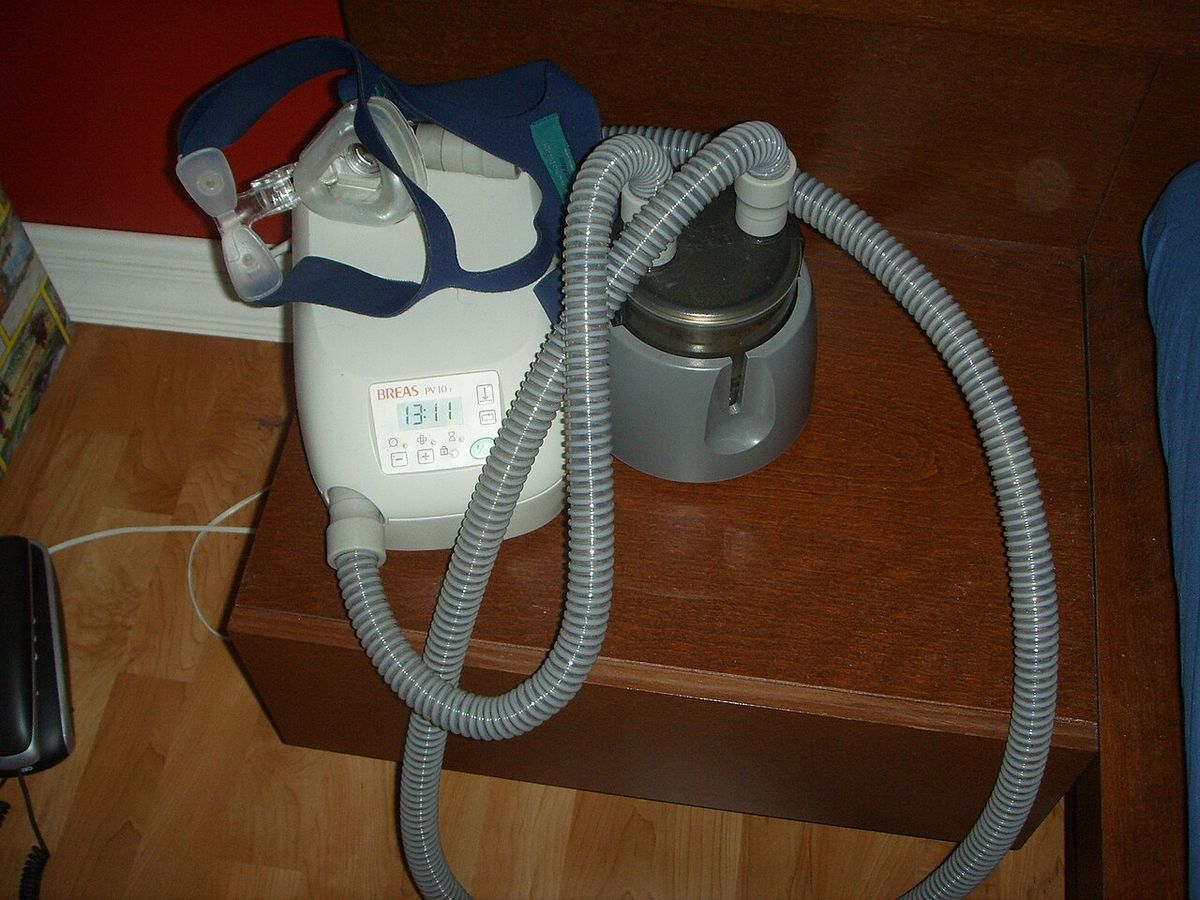
Medical backup sizing starts with the device inventory, measured against each device’s nameplate, because models vary. The planning figures from the medical guide: a CPAP without heated humidifier draws roughly 30–60 watts; with heated humidifier and heated tube, 90–150 watts. An oxygen concentrator draws roughly 300–600 watts continuously — the heavyweight of common home medical loads. A powered wheelchair charger draws roughly 100–300 watts while charging. A small dedicated medication refrigerator draws roughly 50–150 watts running. A hospital bed’s motors draw modest power intermittently; its draw matters less than its need to work on demand.
Now the arithmetic that sizes the system. Overnight CPAP at 100 watts for 8 hours is 0.8 kWh — trivial for any home battery. An oxygen concentrator at 400 watts for 24 hours is 9.6 kWh — roughly two-thirds of a single 13.5–15 kWh battery per day before anything else in the house draws a watt. Add the refrigerator, lights, phone charging, and the furnace blower or a mini-split for climate control, and a full day of medical-priority backup commonly needs 12–20 kWh of usable storage. The decision rule: inventory every medical device with its wattage and required hours, add the household essentials that support care, multiply by your target outage duration in days, and add 25–30 percent margin — more margin than a standard backup sizing, because the consequence of coming up short is not inconvenience. In the guide’s scenarios, a single 13.5–15 kWh battery carries a CPAP-centered household (CPAP, refrigerator, lights, internet, phone charging) through the night with enormous margin; a continuous concentrator household uses 12–20 kWh per day, so a single large battery covers roughly one day and two units cover two days with margin; and for outages beyond 48 hours, the guide points to a battery-plus-generator hybrid.
Transfer behavior is a health feature here, not a spec-sheet detail. Batteries handle short outages with instantaneous, silent switchover and no action required from anyone — a battery with a proper backup configuration keeps a CPAP running through the transition without the sleeper ever knowing the grid failed — while a generator takes 10 to 30 seconds to start and transfer. Even so, add the UPS layer: a small UPS on the CPAP or concentrator bridges the seconds between grid failure and battery transfer and covers the case where the main system faults. Size it for at least 15–30 minutes, and confirm sine-wave output compatibility with your specific device — some devices have specific requirements for sine-wave output or transfer times that your installer should know. Design the rest just as deliberately: a clearly labeled medical-priority backup panel, discretionary loads such as the EV charger, electric dryer, and second AC zone set to shed first automatically, and a witnessed outage simulation at commissioning with the actual medical devices running. One caution the guide states plainly: a battery is not a medical device and carries no medical-grade guarantee, so size conservatively and treat it as one layer of a care plan.
Pool equipment: the pump is the whole question
The pump dominates pool electricity use — typically 70–80 percent of the equipment pad’s consumption — so the backup question is really a pump question, and pump type is destiny. A single-speed pump of 1.5–2 HP draws 1,500–2,500 watts running, which is 12–20 kWh over an 8-hour day. A two-speed pump on high, or a variable-speed pump at high speed, draws 1,500–2,000 watts (12–16 kWh per 8 hours). A variable-speed pump at medium speed draws 400–800 watts (3.2–6.4 kWh per 8 hours). And a variable-speed pump at low-speed filtration draws only 100–300 watts — 0.8–2.4 kWh for the same 8 hours. The physics is the pump affinity law: halving a pump’s speed cuts its power draw to roughly one-eighth, so a pump blasting at 3,450 RPM at around 2,000 watts moves half the water for about 250 watts at half speed.
Run those figures against a typical 13.5 kWh home battery. A single-speed 2,000-watt pump running its usual 8-hour day wants 16 kWh — more than the entire battery, before the refrigerator, the lights, or anything else gets a watt. The verdict is definitive: with a single-speed pump, the pool stays on the non-backed-up panel. The variable-speed version is the opposite story: low-speed filtration at 200 watts costs 1.6 kWh for 8 hours (about 12 percent of the battery), 2.4 kWh over 12 hours, and even a few hours at medium speed — say 600 watts for 3 hours, 1.8 kWh — fits comfortably alongside the refrigerator and lights. Watch the duty-cycle trap inside the schedule: if the pump’s program includes a daily 2-hour high-speed blast for the suction cleaner at 1,800 watts, that single block costs 3.6 kWh, more than all the low-speed filtration combined. The fix is to set a low-speed-only “outage” or “eco” schedule in the pool automation before the storm, not during it.
The supporting cast barely moves the math: a salt chlorine generator draws roughly 100–300 watts while generating and only runs while the pump runs, pool LED lights draw tens of watts, and automation controllers and chemical feeders are trivial loads. The heater is the exception. A gas pool heater needs only its controls and blower — a few hundred watts — and backs up fine. An electric heat-pump pool heater draws 3,000–7,000 watts while heating, and electric resistance heaters are worse still; during an outage, let the pool cool, since a covered pool loses only a few degrees a day. Two practical notes complete the picture: pool water survives 24–48 hours without circulation easily (you may need to shock and rebalance chemistry when power returns), and in cold climates the pump’s freeze protection matters — either keep that low-speed circuit backed up or have a manual drain-down plan. The surgical option many installers use is to back up just the pump’s low-speed circuit, leaving the heater and cleaner circuits on the grid side.
Sump pump: size for the surge, then the duty cycle
Every motor has two wattages, and sump pumps sit at the aggressive end of the range: the starting surge is 2 to 3 times the running wattage. A typical 1/3 HP pump draws roughly 800 running watts but can spike to 1,300–2,900 watts at startup; a common 1/2 HP workhorse draws about 1,050 running watts and can demand 2,150–4,100 watts to start. Exact numbers vary by pump model and head pressure — the higher the pump must lift water, the harder the motor works — so the nameplate’s full-load amps are the source of truth. This is why a battery that looks adequate on paper fails in the pit: an inverter rated for 1,500 watts continuous with a 2,000-watt surge may run a 1/3 HP pump’s 800-watt steady draw beautifully and still fault the first time the float switch triggers. Size battery backup for a sump pump against the starting watts first and the running watts second, with margin to spare.
Runtime, by contrast, is set by the duty cycle, because sump pumps cycle instead of running continuously. Work the guide’s numbers for the 1/3 HP pump at 800 running watts: at a 20 percent duty cycle (running 12 minutes per hour), the average draw is about 160 watts — roughly 3.8 kWh over a full day — and a single 13.5 kWh-class whole-home battery could theoretically carry the pump for more than three days at that cadence. At a 50 percent duty cycle, a serious storm with a high water table, the same pump draws about 9.6 kWh per day, so the same battery gives you a day and change. In a true deluge where the pump runs nearly continuously, you are burning roughly 19 kWh per day, and no single residential battery carries that alone. Your water table and storm history set the battery size, not the pump’s horsepower.
The architecture follows from those two facts. A dedicated 12V backup pump system covers hours per charge; an inverter or portable power station covers hours in the 2–3 kWh class, and only if its surge rating clears your pump’s startup draw — 2,900W or more for a 1/3 HP pump, over 4,000W for a 1/2 HP. A whole-home battery handles any residential pump’s surge effortlessly: the guide cites the Powerwall 3 class at about 11.5 kW continuous and the FranklinWH aPower 2 at about 10 kW. If the pump is on a whole-home system, its circuit must live on the backed-up critical-loads subpanel, configured as a last-to-shed load that outranks the dishwasher, the EV charger, and the second HVAC zone — and if the house has both a primary and a secondary sump circuit, both should land on the backed-up panel. Confirm, too, that the system’s surge capacity covers a big 1/2 HP pump’s roughly 4,000 starting watts on top of whatever else is running.
Well pump: the load with no chart — read the nameplate
The well pump guide is the one source in this hub that deliberately gives no running-watt or surge-watt chart, and that restraint is the lesson. When a well pump motor starts from a dead stop, it pulls locked-rotor current — a brief inrush that can be multiples of its normal running draw, lasting a fraction of a second to a couple of seconds. Two pumps with the same horsepower rating can start very differently, so you never size from horsepower alone. The number that decides the project is the pump’s locked-rotor amps (LRA), found on the nameplate — the metal tag on the pump or control box listing voltage, amperage, and horsepower — or, if it is not there, in the installation manual or the manufacturer’s spec sheet for your exact model, which your well contractor can usually pull from service records. Photograph the nameplate and share it with your electrician and well contractor at the quoting stage.
Pump type changes how hard that start is. Submersible pumps hang inside the well casing, are standard for drilled wells, and are usually the hardest start: the long wire runs — submersible pumps often sit hundreds of feet down — add voltage drop that makes a hard start harder. Jet pumps sit above ground in a basement or pump house and serve shallower wells; their shorter wire runs are a small electrical advantage, and they are easier to service and easier to fit with a soft starter. Constant-pressure or variable-speed pumps are the friendliest category: they ramp up gradually and are inherently kinder to battery inverters, though you should confirm the drive is compatible with your battery system’s output. Either way, the inverter’s peak or surge rating must comfortably cover the pump’s locked-rotor draw plus other loads likely to be running when it starts, and the system should be designed for the pump starting alongside other household loads, not in isolation. A soft starter or variable-frequency drive can tame the inrush current; have your well contractor and electrician evaluate it together, since it must suit both the pump and the battery’s output.
The guide’s best runtime trick is not electrical at all: your pressure tank is the cheapest battery you can buy. The tank holds a reserve of pressurized water — the drawdown volume between the pressure switch’s cut-in and cut-out settings — and every gallon drawn from it is a gallon the pump never has to move. A healthy, generously sized tank can keep the pump from starting at all for hours during an outage, and fewer starts mean fewer surges for the battery to absorb; an old, waterlogged, or undersized tank does the opposite, short-cycling the pump and hammering both the pump and the battery system. Have the tank’s air pre-charge and condition checked before buying more battery capacity. Do not forget the companion load: many rural homes pair the well with a septic effluent, grinder, or mound-system pump, a motor load with its own surge, usually smaller than the well pump’s — ask about putting it on backed-up circuits too, and make sure any high-water alarm has backup power. Well-ready systems usually land in the upper portion of residential battery pricing, because the surge pushes you toward an inverter with strong peak output and often toward more storage for multi-day outages.
Air conditioner: kW decides if it starts, kWh decides how long
An air conditioner has the same two personalities as every motor load here, at the largest scale in the house. Central systems are sized in tons — a 3-ton unit sits near the middle of the residential range, with larger homes running 4- or 5-ton systems — and roughly speaking, each ton needs on the order of a kilowatt or more of running power, so a mid-size system might draw 3 to 4 kW while running. The startup surge is the gatekeeper: locked-rotor amps mean a single-stage compressor briefly draws several times its normal running current — often three to five times as much — for less than a second. A battery can run your AC only if its surge rating clears that LRA spike and its continuous rating covers the running draw. That is why a battery with plenty of stored energy — say 13.5 kWh, enough to run a refrigerator for a day — may still fail to start a 4-ton AC: kilowatt-hours determine how long you can cool; kilowatts determine whether the compressor starts at all.
Once it starts, the endurance math is usable kWh divided by running kW. The guide’s concrete example: with a 13.5 kWh battery and about half of it, roughly 6.75 kWh, effectively available for cooling after reserving capacity for essentials, an AC drawing about 3 kW buys a little over two hours of continuous compressor runtime; at a lighter 1.5 kW draw, the same energy stretches toward four or more hours. Real-world runtime is usually better, because compressors cycle — once the home hits setpoint, the compressor rests and only the air-handler fan sips power — while inverter conversion losses shave roughly 5 to 10 percent off. Pre-cooling a well-insulated home before an outage stretches runtime further; a heat wave that runs the compressor nonstop drains the battery at full draw.
Compressor technology matters as much as tonnage. Older single-stage central ACs are the hardest loads: the compressor slams on at full power every cycle, demanding its entire LRA spike at once. Inverter-driven heat pumps and variable-speed systems ramp up gradually over several seconds with no violent spike — a single battery that cannot start a 4-ton single-stage AC might comfortably run a 3-ton inverter heat pump all afternoon — and two-stage systems fall in between. A soft-start kit changes the equation: installed on the compressor by a qualified technician, it ramps the motor up gradually and cuts the startup spike dramatically, often by more than half, without changing running power or adding storage; for many homeowners it is the difference between needing a second battery and not. The guide’s typical line-up: a ductless mini-split of 1–2 zones usually works on a single battery; a small central AC or heat pump of 1.5–2.5 ton usually works on a single battery, often with a soft-start kit; a mid-size 3–3.5 ton central AC usually takes two batteries with a soft-start kit recommended; and a large 4–5 ton system takes two or more batteries plus a soft start, with LRA verified. If whole-home AC backup breaks the budget, back up one mini-split zone that cools the bedrooms instead.
Home servers and network gear: an energy problem, not a power problem
Server loads invert the usual math: they are small but continuous, 24/7, with no duty cycle to hide behind, so sizing is almost entirely an energy (kWh) problem rather than a power (kW) problem. The measured figures from the server guide: a 4-bay NAS runs 40 to 70 watts active and 20 to 30 watts idle; an 8-bay unit with 7200-RPM drives runs 80 to 120 watts. A managed PoE switch feeding cameras and access points draws 30 to 80 watts depending on PoE load. A mini-PC or NUC server sips 15 to 40 watts; a full 2U rack server with dual power supplies draws 150 to 400 watts at typical home-lab utilization. Add the supporting cast — the ONT or cable modem at 10 to 20 watts, the router at 15 to 30 watts, the smart-home hub, and attached drives — and a typical prosumer setup lands at 150 to 300 watts continuous (3.6 to 7.2 kWh per day), while a serious home lab lands at 400 to 800 watts (9.6 to 19.2 kWh per day). One load to exclude deliberately: a portable AC keeping a rack closet habitable draws 800 to 1,500 watts and usually gets shed, with a 10 to 30 watt exhaust fan as the backed-up alternative.
The transfer requirement is the strictest in this hub, because a power interruption of even a few cycles can crash a hypervisor or corrupt a database mid-transaction — an outage of four seconds is enough to corrupt a RAID array mid-write. The correct architecture is two layers. Layer one is a UPS at the rack whose job is the first milliseconds: bridging the transfer gap, conditioning power, and providing the shutdown signaling servers need. Whole-home batteries transfer in milliseconds to a few cycles, which most modern server power supplies ride through — but “most” is not “all,” and the battery provides no shutdown signaling to your NAS. Layer two is the battery (or a large portable station) feeding the rack’s circuit, whose job is the hours, keeping the UPS fed so its internal battery never actually discharges. Neither layer substitutes for the other: a 1500VA desktop UPS alone gives a 300-watt rack maybe 15 to 25 minutes, and a battery alone postpones the unclean shutdown without preventing it. Size the UPS for the rack’s peak wattage plus 25 percent headroom, insist on pure sine wave output (non-negotiable for modern active-PFC server power supplies), and prefer a line-interactive or online double-conversion unit with network or USB shutdown signaling compatible with your NAS — an online double-conversion UPS makes the battery’s transfer time irrelevant, since it always runs from its inverter.
Size the battery layer as watts × hours ÷ 1000, plus 15 to 20 percent margin for inverter losses and battery aging: a 250-watt prosumer rack needs about 3.5 kWh for 12 hours, about 7 kWh for 24 hours, and about 14 kWh for 48 hours; a 600-watt home lab needs roughly 17 kWh for 24 hours. In hardware terms, a large portable power station of 2 to 3.6 kWh covers a prosumer rack for 8 to 14 hours — the overnight tier, and the sweet spot for many — while a wall-mounted home battery of 10 to 13.5 kWh backing the whole circuit panel suits whole-house duty or outages that routinely exceed a day. Finish with the part everyone skips: graceful shutdown. Configure the UPS low-battery signal to trigger an ordered shutdown with 10 to 15 minutes of UPS runtime held in reserve — stop services and VMs first, then hosts, then storage last — use the home battery’s low state-of-charge alerts (a threshold such as 25 percent) as the earlier warning, and document the power-up sequence (network gear first, then storage, then compute, then services). Test the full sequence quarterly.
Elevator and stairlift: tiny energy, serious surge
Residential elevators are surprisingly modest loads in energy terms and demanding ones in power terms. A typical hydraulic or traction residential elevator draws 3 to 7 kW while running — the motor working for 30 to 60 seconds per trip — and essentially nothing at idle beyond the controller, lights, and phone, at 20 to 60 watts standby. The energy per trip is tiny: a 5-kW motor running 45 seconds consumes about 0.06 kWh. Fifty trips in a day — an extremely busy household — is 3 kWh, and even 100 trips plus 24 hours of standby comes to under 8 kWh. The number that matters most is locked-rotor and starting current: elevator motors draw 3 to 6 times their running current at startup, and the battery inverter must handle that surge without tripping, ideally with headroom — a tripped inverter with someone between floors is the failure mode you are engineering against. Most residential units are 220–240V single-phase, and the controller requires a clean sine wave, so specify pure sine wave output and get the running amps and locked-rotor amps from the manufacturer or installer. The lift drives the inverter choice; the household drives the battery size.
Keep one distinction clear: the battery lowering device built into most modern residential elevators is a single-use emergency feature that brings the car to the nearest landing once during a power loss. It is not continued operation. Three architectures provide the real thing. A dedicated elevator UPS — typically a 6 to 10-kVA online double-conversion unit — gives 15 to 45 minutes of continued operation: enough for the current trip plus several more, and enough to ride out the short blips that make up most outages. Adding the elevator circuit to a whole-home battery’s backed-up panel is often just a wiring decision, provided the inverter’s surge rating covers the elevator’s locked-rotor current alongside the other backed-up loads and the transfer time (milliseconds for most home batteries) does not fault the elevator controller — a witnessed test with the elevator running through a simulated outage is mandatory before sign-off. Or a dedicated small battery system of 5 to 10 kWh can carry the lift plus essentials such as stairwell lighting and the phone system. Whichever route you take, the auxiliary loads must be on the backed-up circuit too: car lighting, the emergency phone or communicator, shaft lighting, and any pit equipment like sump pumps. And because the cost of discovering a fault is entrapment, test under load quarterly: a full trip on backup power, with the emergency phone confirmed working.
Stairlifts are the easy case in this hub. Most modern stairlifts run on 24-volt DC with internal batteries that charge from a standard outlet, giving 8 to 20 trips on their internal batteries during an outage — inherently outage-resilient by design. No major system is needed: keeping that charger outlet powered, on a backed-up circuit or a small UPS, is usually sufficient to keep the batteries topped up through a long outage.
ADU and guest house: a small house with its own load profile
An accessory dwelling unit runs leaner than a main house, but its loads are lumpy in their own way. The ADU guide’s typical running watts: a ductless mini-split for heating and cooling at roughly 800–1,500 watts running, with higher startup draw; a full-size or apartment refrigerator at around 100–200 watts running, cycling on and off; LED lighting and outlets at a few hundred watts combined (the guide’s table puts lighting plus outlets at 100–300 watts); an induction cooktop or compact range at 1,200–1,800 watts while cooking — heavy but brief; a heat-pump water heater or small tankless unit at a few hundred watts in heat-pump mode (300–600 watts in the guide’s table), but several thousand watts if it falls back to resistance heat, which makes resistance mode a battery killer; and a compact washer and dryer at 1,000–1,500 watts, usually left non-backed-up so laundry waits for the grid. An EV charger at 7,000–11,000 watts stays off backup entirely. Daily consumption commonly lands in the 8–15 kWh range for a one- or two-bedroom unit — roughly a quarter to a third of a typical large home.
Two sizing truths fall out of that table. First, a 5 kWh modular battery — the class of unit many owners consider too small for a main house — is often a perfectly respectable full day of essential ADU backup, and a 5–10 kWh battery is the guide’s typical standalone size. Second, the single most consequential decision is whether the mini-split and the water heater make the backed-up list; those two loads determine whether you need one battery unit or two, and if the ADU has gas for heat and hot water, the sizing gets easier still.
Architecture comes before sizing, because the detached unit has its own subpanel and a trench of conduit between it and the main house. Most ADUs are subpanels of the main house, fed by a 60-amp or 100-amp feeder; in that arrangement, a single battery system on the main house can back up the ADU too, provided the ADU’s feeder lands on the backed-up side of the system so an outage does not strand the ADU on the grid side. A separately metered ADU is different: each service generally needs its own interconnection application and its own backup arrangement, because one battery system cannot cleanly span two utility meters. And where the ADU’s loads or a long feeder run push a shared system past its continuous-power limits, a small dedicated battery at the ADU can be cheaper than upsizing the whole-house system. Solar closes the loop: a modest array on an ADU roof — California’s energy code typically requires 1.8–3.5 kW on new detached ADUs in the 600–1,200 square-foot range, with exemptions for very small or heavily shaded units — recharges a 5–10 kWh battery daily and stretches outage runtime from hours to days.
Home addition: the house outgrows the battery’s two ratings
An addition stresses both halves of battery sizing at once, and it usually punishes the power (kW) rating first. The addition guide’s scenario: the original home carried one 13.5-kWh-class unit — a Tesla Powerwall 3 with around 13.5 kWh usable and roughly 11.5 kW of continuous output — backing up the refrigerator, lights, internet, a gas furnace blower, and part of one HVAC system. Then a 600-square-foot primary suite arrives with its own mini-split, heated bathroom floors, and a kitchenette with a second refrigerator and a microwave. The mini-split alone can add 1.5 to 3.5 kW of running load, and its compressor startup draws a surge several times higher for a fraction of a second, while the bathroom floor heat and extra refrigeration quietly raise the energy draw all evening.
Three failure modes follow. The battery drains faster, and an outage that once lasted until morning now ends at 2 a.m. The new loads push simultaneous demand past the inverter’s continuous output, and the system sheds loads or faults when the mini-split starts while the dryer is running — even though the battery is half full. Or, most commonly of all, the new circuits were never moved onto the backed-up panel at all, so the addition goes dark in every outage while the original house hums along. The fix is a sorting exercise done with your electrician: every new circuit goes into must-run (refrigeration, the new HVAC zone, medical devices, the sump pump if the addition is over a basement), nice-to-run (lighting, outlets, internet), or skip-during-outage (electric floor heat, the second dryer, the steam shower). Add up the running watts in the first two buckets, add the starting surges of the largest motors, and compare the total against the system’s continuous kW output with at least 20 percent headroom. If the addition tips you over, the honest paths are growing the existing modular system, managing loads smarter with a smart panel or reworked critical-loads subpanel so the addition’s heavy loads simply do not get backed up, or — rarely, and usually wrong for a single addition — a second independent system.
Master sizing table: every load side by side
The table collects the ten guides’ figures in one place. Running and surge watts are the sources’ figures; the 8-hour column is the straight arithmetic of running watts × 8 hours ÷ 1000, shown as a continuous-running equivalent — for cycling loads, the notes give the duty-cycle figure that actually governs runtime, and for the elevator the honest unit is the trip, not the hour. Where a source states no wattage, the cell says so rather than guessing.
| Load | Running W | Surge W | kWh for 8h | Notes |
|---|---|---|---|---|
| Home office — laptop setup (laptop, monitor, network) | ~150 (office total 100–250) | — | ~1.2 | ~28 hours on a 5 kWh battery; space heater (1,000–1,500W) breaks the math |
| Home office — desktop workstation setup | ~400 (300–500+) | — | ~3.2 | ~11 hours on 5 kWh; ~30 hours on 13.5 kWh; keep a UPS for the battery’s switchover gap |
| CPAP | 30–60 without heated humidifier; 90–150 with | — | 0.24–1.2 | Overnight at 100W = 0.8 kWh; add a UPS sized for 15–30 minutes |
| Oxygen concentrator | 300–600 continuous | — | 2.4–4.8 | The load that sizes a medical system: 9.6 kWh/day at 400W; full medical-priority day commonly 12–20 kWh |
| Powered wheelchair charger | 100–300 while charging | — | 0.8–2.4 while charging | Charging load only, per the medical guide’s planning figures |
| Medication refrigerator | 50–150 running | — | 0.4–1.2 continuous equivalent | Small dedicated unit; running figure from the medical guide |
| Pool pump — single-speed, 1.5–2 HP | 1,500–2,500 | Not stated in source | 12–20 | Exceeds most home batteries alongside household essentials; keep off the backed-up panel |
| Pool pump — variable-speed, low-speed filtration | 100–300 | Not stated in source | 0.8–2.4 | Backs up trivially; set a low-speed-only outage schedule |
| Pool pump — variable-speed, medium speed | 400–800 | Not stated in source | 3.2–6.4 | Yes, with planning; high-speed cleaner cycles are the hidden cost |
| Electric heat-pump pool heater | 3,000–7,000 | Not stated in source | 24–56 continuous equivalent | Keep off backup; a gas heater’s controls and blower (a few hundred watts) back up fine |
| Sump pump — 1/3 HP | ~800 | 1,300–2,900 | 6.4 continuous equivalent; ~1.28 per 8h at a 20% duty cycle | Duty cycle decides runtime: ~3.8 kWh/day at 20% duty, ~19 kWh/day near-continuous |
| Sump pump — 1/2 HP | ~1,050 | 2,150–4,100 | 8.4 continuous equivalent | Size the inverter against starting watts first; verify against the nameplate |
| Well pump | Not stated — see nameplate | Locked-rotor amps: several × running | Not stated — depends on nameplate and use | Never size from horsepower alone; a healthy pressure tank can keep the pump from starting for hours |
| Central AC — mid-size (3-ton class) | 3,000–4,000 | LRA: often 3–5× running | 24–32 continuous equivalent | Compressors cycle, so real runtime beats the raw math; example: ~6.75 kWh available = just over 2 hours at 3 kW |
| Mini-split — ADU, one head | 800–1,500 | Higher startup draw (figure not stated) | 6.4–12 continuous equivalent | The ADU comfort load that matters most; AC guide notes inverter-driven units ramp up gently |
| Home server rack — prosumer | 150–300 continuous | — continuous electronic load | 1.2–2.4 | 3.6–7.2 kWh/day; a 250W rack needs ~3.5 kWh for 12h, ~7 kWh for 24h; UPS layer mandatory |
| Home server rack — serious home lab | 400–800 continuous | — continuous electronic load | 3.2–6.4 | 9.6–19.2 kWh/day; a 600W lab needs roughly 17 kWh for 24 hours |
| Residential elevator | 3,000–7,000 (standby 20–60) | 3–6× running current | ~0.06 per trip — not a continuous load | 50 trips/day = 3 kWh; the inverter’s surge rating matters more than battery size |
| Stairlift | Charger outlet only; lift runs on internal 24V batteries | — | — | 8–20 trips on internal batteries; keep the charger outlet on a backed-up circuit or small UPS |
| ADU — essential loads combined | Varies by appliance — see ADU section | Varies | 8–15 per full day | A 5–10 kWh battery is the typical standalone size; EV charger (7,000–11,000W) stays off backup |
| Home addition — new mini-split | 1,500–3,500 | Several × running at startup | 12–28 continuous equivalent | The addition load that pushes the inverter’s continuous kW first; keep at least 20% headroom |
Whole-home vs. critical loads: where these loads belong
Read across the ten guides and the same design conclusion keeps appearing: back up a disciplined list, not the whole house by default. A critical-loads panel carrying the office, network gear, refrigerator, lights, furnace blower, the medical-priority circuits, the sump pump as a last-to-shed load, and the well pump lets a modest battery deliver days of the service the household actually needs — the office guide’s phrasing is that excluding energy hogs transforms the economics, and the well guide notes that the partial-backup approach can lower the required battery size and cost compared with backing up everything. The loads the sources consistently leave on the grid side tell the same story from the other direction: the single-speed pool pump and electric pool heater, the EV charger, the electric dryer and water heater, the workshop loads and second laundry in an addition, and the rack-closet portable AC.
Whole-home backup earns its premium when the must-run list is genuinely whole-home-sized: a continuous oxygen concentrator plus climate control, a high-water-table sump pump in a multi-day outage region, an elevator a household member depends on, or a large addition whose new zone must stay live. Even then, the guides’ whole-home designs still shed discretionary loads first and still prioritize — the difference is capacity, not philosophy. And for the longest outages, three of the guides converge on the same extender: solar recharging, which turns a finite battery into a system that refills daily — decisive for the sump pump’s third day, for a 250W server rack that a modest array covers trivially, and for an ADU whose 5–10 kWh battery refills from its own roof. Sizing the whole system is covered in the home battery sizing guide, and the panel design itself in the critical-loads subpanel design guide.
The verdict: what a home battery can power, honestly
A home battery can power your office for a full workday and well beyond, your CPAP through any night, your network and servers through the night and — with the UPS layer and a shutdown plan — through anything. It can power a variable-speed pool pump on low speed almost as an afterthought, an elevator all day for less energy than a clothes dryer uses in an evening, a stairlift’s charger without thinking about it, and a guest house’s essentials on a battery the main house would consider small. It can start and run a sump pump or a well pump or an air conditioner — provided the inverter’s surge rating clears that motor’s locked-rotor spike, which is a nameplate question, not a marketing question.
What it cannot do is repeal arithmetic. It cannot feed a single-speed pool pump’s 12–20 kWh day alongside the house, run a central AC continuously for long on a single unit, carry a near-continuously running sump pump through a deluge alone, or keep a medical household’s concentrator running for days without either a second unit, solar recharging, or a generator covering the long tail — the hybrid case is covered in the battery-generator hybrid sizing guide, and the cost side in the whole-home battery cost guide and the battery vs. generator cost comparison. So size in the order this hub used: surge first, so the load can start; duty-cycle-adjusted kWh second, so it can keep running; transfer protection third, for the loads that cannot blink. Do that, load by load, and the question “what can a home battery power?” stops being a guess and becomes a list you have already verified.
EcoFlow DELTA 3 Portable Power Station (1024Wh LiFePO4)

Audit-verified portable alternative for the light-load sections (office, servers, sump) of this sizing hub.
*Affiliate Disclosure: As an Amazon Associate, Elevate Home earns from qualifying purchases. Pricing and availability subject to change.
Frequently asked questions
How do I calculate how long a battery will run a load?
Runtime ≈ usable battery Wh ÷ load W, derated ~10–15% for inverter and conversion losses. A laptop office at ~150W runs ~28 hours on 5 kWh; a desktop office at ~400W runs ~11 hours on the same battery. For cycling loads, apply the duty cycle first: a sump pump running 20% of the time averages about 160W, not its 800W running draw.
How many watts does a sump pump need from battery backup?
Size against the starting watts first, not the running draw. A 1/3 HP pump draws roughly 800 running watts but can surge to 1,300–2,900 watts at startup; a 1/2 HP pump draws about 1,050 watts running with 2,150–4,100 watts of surge. An inverter or battery system that covers the running draw but not the surge will fault the first time the float switch triggers.
Can a single home battery run a central air conditioner?
Sometimes. A single battery can often run a smaller or inverter-driven system, but a large single-stage central AC may demand more startup surge than one battery can deliver. The deciding factor is the compressor's locked-rotor amps (LRA) versus the battery's surge rating — not the battery's kilowatt-hour capacity. A soft-start kit, which cuts the startup spike often by more than half, frequently makes a single battery work.
How do I calculate the battery size for medical equipment?
Inventory each device's wattage (from the nameplate) and required hours: CPAP ~30–150W, oxygen concentrator ~300–600W continuous, wheelchair charger ~100–300W, medication fridge ~50–150W. Multiply watts × hours for each, add household essentials supporting care, multiply by target outage days, and add 25–30% margin — more margin than standard backup sizing, because the stakes are health, not convenience.
Do I still need a UPS if I have a whole-home battery?
Yes, for transfer-sensitive loads. A home battery's switchover — a fraction of a second to a few seconds — can reboot a desktop, and whole-home batteries transfer in milliseconds to a few cycles with no shutdown signaling for servers. A UPS bridges that gap seamlessly: on a CPAP or concentrator it also covers the case where the main system faults (size it for at least 15–30 minutes), and at a server rack it provides the USB/network signaling for graceful shutdown.
Can a home battery run my single-speed pool pump?
Not as-is. A single-speed 1.5–2 HP pump draws 1,500–2,500 watts — running it 8 hours uses 12–20 kWh, more than most home batteries hold. A variable-speed pump at low-speed filtration draws only 100–300 watts, or under 2.5 kWh for the same 8 hours. The practical fixes: upgrade to a variable-speed pump, or leave the pool on the non-backed-up panel — pool water easily survives 24–48 hours without circulation.
How do I find my well pump's starting power requirement?
Start with the pump's nameplate for voltage and amperage, and look for locked-rotor amps (LRA) there or in the installation manual. If the tag is missing or unreadable, your well contractor can usually identify the pump model from service records and pull the manufacturer's spec sheet. Never estimate from horsepower alone — two pumps with the same rating can start very differently.
Don't elevators already have battery backup built in?
Most modern residential elevators include a battery lowering device that brings the car to the nearest landing once during a power loss. That's a single-use emergency feature, not continued operation. A backup battery system — a dedicated elevator UPS, the elevator circuit on a whole-home battery's backed-up panel, or a dedicated small battery — keeps the lift running normally through the whole outage. Elevators draw 3–7 kW while running but only about 0.06 kWh per trip, so the requirement is surge-capable inverter capacity rather than large storage.
Keep reading
System Sizing
How to Size a Home Battery Backup System: Partial vs Whole Home, Worked Math (2026)
Size a home battery step by step: critical loads, kWh math, surge checks, multi-day outages, and the partial v…
Cost Guide
Whole Home Battery Backup Cost: 2026 US Price Guide
Whole home battery backup cost in 2026: realistic US price ranges for equipment, installation, panel upgrades …
Decision Guide
Home Battery vs Generator: True Costs and Which to Choose
Home battery vs generator: compare 2026 installed costs, 10-year fuel and maintenance, outage runtime, noise, …
Battery Planning
Critical Loads Subpanel Design Guide
Design your critical loads subpanel for battery backup: which circuits to back up, realistic wattage budgets, …
Hybrid Backup Systems
Battery + Generator Hybrid Sizing Guide
Battery and generator hybrid sizing guide: how much battery for the night shift, how much generator for heavy …
Interactive Tool
Home Battery Size Calculator: What Size Do You Need?
How many kWh of battery storage do you need? Our free home battery size calculator estimates your backup need,…