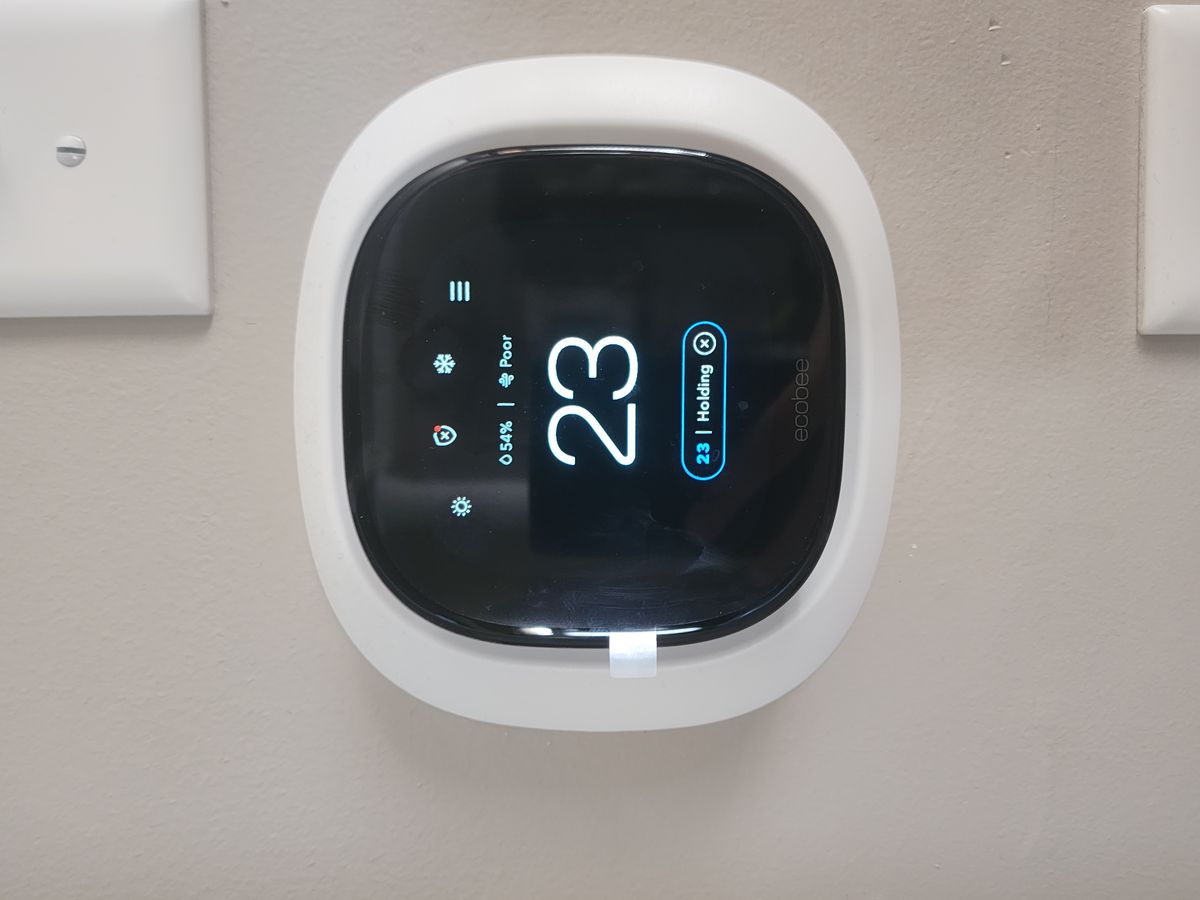
Ecobee vs Nest Thermostat: 2026 Guide
Key takeaways
- Ecobee's edge is remote SmartSensors with occupancy detection (up to 32 supported, one in the box) — the best answer for houses with rooms that run hot or cold relative to the hallway thermostat.
- Nest's edge is auto-learning: it builds a schedule from your behavior over a couple of weeks, ideal for households that will never program anything.
- Ecosystem decides plenty: ecobee has native Apple HomeKit; Nest reaches Apple Home only through Matter with reduced functionality — Google Home households should lean Nest.
- Ecobee includes a Power Extender Kit for no-C-wire homes; Nest's 4th gen often manages without one but may need the separate Power Connector on finicky systems.
- For multi-zone luxury homes, make the choice with your HVAC contractor — equipment compatibility and staging logic matter more than consumer features.
The smart-thermostat market has consolidated to essentially three names — ecobee, Google Nest, and Honeywell — and for most homeowners the real decision is between the first two. Ecobee’s Smart Thermostat Premium and Google’s Nest Learning Thermostat (4th gen) sit at nearly identical price points, both promise energy savings, and both will happily run your HVAC. But they were built on opposite philosophies: ecobee bets on remote sensors and platform openness; Nest bets on learning your habits and disappearing into the wall.
This Ecobee vs Nest guide compares the two on the factors that actually decide comfort and savings in 2026 — remote sensors, learning vs scheduling, HomeKit and Matter support, C-wire handling, and which wins for multi-zone and luxury homes — with verdicts matched to your system type rather than a single winner.
Two philosophies of comfort
Ecobee thinks in rooms. Its headline feature is the SmartSensor: small wireless pucks that report temperature and occupancy from the rooms that matter, so the thermostat stops optimizing for the hallway it happens to hang in and starts optimizing for where people actually are. The Follow Me feature averages occupied rooms; you can also pin the schedule to a specific sensor (“use the bedroom sensor from 10 p.m. to 6 a.m.”). It’s a multi-room comfort strategy, and it directly attacks the most common thermostat complaint: the upstairs is four degrees warmer than downstairs.
Nest thinks in habits. The Learning Thermostat’s signature move is auto-scheduling: wear it for a week or two, adjusting as you live, and it builds a program from your behavior. No programming, no app fiddling — it learns. Combined with Home/Away Assist (geofencing plus on-device activity sensing), Nest’s pitch is the thermostat you never touch. It’s elegant, it’s simple, and for households with regular routines it genuinely works.
Neither philosophy is wrong. The question is which problem your house has: rooms that lie about each other’s temperature (ecobee’s territory), or a household that won’t program anything and needs the thermostat to figure it out (Nest’s territory).
ecobee Smart Thermostat Premium with SmartSensor & Air Quality

Includes built-in air quality monitor and remote room sensors
*Affiliate Disclosure: As an Amazon Associate, Elevate Home earns from qualifying purchases. Pricing and availability subject to change.
Remote sensors: ecobee’s home turf
This is the sharpest difference between the two, so let’s be specific. The ecobee Smart Thermostat Premium ships with a SmartSensor in the box and supports up to 32 of them. Each sensor reports temperature and occupancy. That occupancy data powers Follow Me mode, which weights the temperature average toward rooms people are actually in — so an empty sun-baked living room doesn’t drag the whole house’s cooling setpoint around.
Nest’s 4th-gen Learning Thermostat now includes a remote temperature sensor in many bundles and supports up to six — a real improvement over earlier generations — but the sensors report temperature only, with no occupancy detection, and the platform’s room-level logic is thinner. If your house has a two-story temperature split, a bonus room over the garage, or a home office that bakes in the afternoon sun, ecobee’s sensor strategy is the more complete answer. It’s not close.
The honest caveat: sensors can’t fix broken HVAC. If one room is ten degrees off, you likely have a duct, insulation, or equipment problem — no thermostat solves that. Sensors shine on the three-to-five-degree imbalances that are normal in real houses.
Learning vs scheduling: who does the thinking?
Nest’s auto-learning is its defining feature and, for the right household, its killer app. Live your life for a couple of weeks, turn the dial when you’re uncomfortable, and the thermostat assembles a schedule from your adjustments. Reviewers consistently note the learning takes about two weeks to settle — which, as one tester put it, is longer than the five minutes it would take to program a schedule manually, but the point is you never have to.
Ecobee takes the opposite approach: eco+ and smart scheduling that you configure, with features like Smart Home/Away (using sensor occupancy to adjust when the house empties unexpectedly). It’s more hands-on initially and more transparent about what it’s doing — you can see and edit the logic. Power users tend to prefer this; set-and-forget households tend to prefer Nest’s approach.
The practical difference in savings is smaller than the marketing suggests. Both are ENERGY STAR certified; both claim double-digit percentage savings on heating and cooling (manufacturers cite figures in the mid-teens to mid-twenties percent range). Independent verification of those exact numbers is hard to come by — treat them as directional, not guaranteed. The thermostat that saves you the most is the one whose logic matches how your household actually lives.
Smart-home integration: HomeKit, Matter, and the ecosystem question
This is where the two diverge hardest, and for many buyers it settles the debate. Ecobee works natively with Apple HomeKit, Amazon Alexa, Google Home, and SmartThings — the broadest native platform support in the category. If you’re an iPhone household running Apple Home, ecobee is the natural and frankly the only full-featured choice.
Nest, being Google’s product, is a Google Home native. It supports Matter, which gives it a path into Apple Home — but it’s a limited path, with reduced functionality compared to ecobee’s native HomeKit integration. Alexa works fine with Nest. So the ecosystem rule of thumb: Google Home household? Nest is the smoother fit. Apple Home household? Ecobee, decisively. Mixed or platform-agnostic? Ecobee’s breadth wins.
Ecobee also offers a built-in Alexa speaker in the Premium model — the thermostat itself can answer questions and run routines. It’s a genuinely useful hallway feature once the novelty wears off, though it won’t replace a real smart speaker for music.
C-wire, compatibility, and installation reality
Before either thermostat matters, it has to work with your HVAC. The C-wire (common wire) question decides whether installation is a 20-minute DIY job or a call to an HVAC tech:
- Ecobee includes a Power Extender Kit (PEK) in the box, which lets it work in homes without a C-wire — a clean, documented solution that reviewers consistently praise. Ecobee claims broad system compatibility and offers particularly clear controls for heat pumps, including compressor lockout settings and auxiliary-heat management.
- Nest 4th gen includes a rechargeable battery and can often operate without a C-wire, but on some systems — especially older or multi-stage equipment — it may need the separate Nest Power Connector or a real C-wire run. “Often works” is not “always works,” and power-stealing behavior on finicky control boards is the classic source of Nest weirdness (short cycling, Wi-Fi dropouts).
Both handle heat pumps, dual-fuel systems, and multi-stage equipment. For complex systems — multi-zone, dual-fuel with backup heat, or anything the last tech called “interesting” — get an HVAC professional involved regardless of brand. A miswired thermostat can run expensive auxiliary heat far more than necessary, and that mistake costs more than the install visit. Check compatibility with your specific equipment on the manufacturer’s checker before buying, and have a licensed HVAC tech do the install if anything about your system is non-standard.
Ecobee vs Nest: the side-by-side comparison
| Factor | ecobee Smart Thermostat Premium | Google Nest Learning (4th gen) |
|---|---|---|
| Street price (2026) | ~$230–$260 | ~$240–$280 |
| Remote sensors included | 1 SmartSensor (temp + occupancy) | 1 temp sensor in most bundles |
| Max sensors supported | 32 | 6 |
| Sensor data | Temperature + occupancy | Temperature only |
| Scheduling approach | eco+ smart scheduling you configure | Auto-learning from your adjustments |
| Apple HomeKit | Native | Via Matter only (limited) |
| Matter support | Yes | Yes |
| No C-wire solution | Power Extender Kit included | Battery + optional Power Connector |
| Built-in voice assistant | Alexa speaker built in | Google Assistant via linked devices |
| Air quality monitoring | Yes (built-in sensor) | No |
| Warranty | 3 years | 2 years |
| Subscription | None required | None required |
Prices move with promotions; verify current pricing before buying. Neither charges a subscription for core thermostat features.
Multi-zone and luxury homes: a special case
The plan angle asks which wins for multi-zone luxury homes, and the honest answer is: often neither, directly. True multi-zone luxury homes — with zone dampers, multiple air handlers, radiant floors, or dedicated HVAC per wing — frequently need pro-grade thermostats or full building-automation integration (Control4, Savant, Crestron talking to the HVAC through proper interfaces). A $250 consumer thermostat per zone can work, but the integration, staging logic, and service story get complicated fast.
Where ecobee earns the luxury-home nod: its sensor density (up to 32) and HomeKit/SmartThings integration make it the better fit for large homes running consumer-grade systems with many rooms to balance, especially when a pro installer is doing the work. Where Nest fits: simpler luxury builds where the household wants zero interaction and the HVAC is conventional. Either way, multi-zone homes should have the thermostat choice made jointly with the HVAC contractor — the equipment compatibility question dominates everything else at this tier.
The verdict: match the thermostat to the system
No universal winner — the right pick follows your HVAC and your household:
- Choose ecobee if: you have rooms with real temperature differences; you’re on Apple Home; you have a heat pump or dual-fuel system and want clear staging controls; there’s no C-wire and you want the included Power Extender Kit; or you like seeing and tuning the logic.
- Choose Nest if: you’re deep in Google Home; you want the thermostat to program itself and never think about it again; your system is conventional with a C-wire; or the round dial and industrial design genuinely matter to you (it’s the best-looking thermostat made, and that counts for something on a hallway wall).
- Choose with your HVAC tech if: the system is multi-zone, has no C-wire and finicky controls, or anything about the equipment is unusual. Compatibility beats features every time.
Pairing vents with the right thermostat and sensors
Smart vents are force multipliers, not standalone solutions — they need a brain. Flair’s system centers on the Puck, which acts as thermostat, sensor, and controller in one; Keen’s vents pair with a smart bridge and temperature sensors and integrate with platforms like SmartThings. In both cases, the best results come when the vents coordinate with a capable smart thermostat rather than fighting it.
The winning combination for most homes: a smart thermostat with room sensors (ecobee’s SmartSensor strategy is the natural partner here) plus smart vents on the problem rooms. The thermostat handles the big picture — when the system runs and at what setpoint — while the vents handle the distribution, nudging airflow toward the rooms that need it. Set the thermostat’s schedule first, get the house broadly comfortable, then add vents to fix the two or three rooms that still misbehave. Adding vents to a house with a dumb thermostat and no sensors is putting precision instruments on a blunt system; you’ll get some benefit, but you’ll leave most of it on the table. And whatever the combination, keep the HVAC contractor in the loop — they should know the vents exist before they service the system.
Next steps
Start at your electrical panel and your thermostat wiring: confirm whether you have a C-wire, photograph the existing wiring, and run your equipment through the manufacturer’s compatibility checker. If the system is standard and you have a C-wire, either thermostat is a straightforward DIY install. If there’s no C-wire, complex staging, or multi-zone equipment, get a licensed HVAC professional to handle the install — the visit costs less than a season of misconfigured auxiliary heat. Buy from a retailer with a good return policy, live with your choice for a month across varying weather, and keep the old thermostat in a drawer until you’re sure. Costs are 2026 US market ranges; get itemized local quotes for any pro-installed work. Estimates for planning only.
Google Nest Learning Thermostat 4th Gen

A strong alternative to our top pick — compare features and reviews before you buy.
*Affiliate Disclosure: As an Amazon Associate, Elevate Home earns from qualifying purchases. Pricing and availability subject to change.
Frequently asked questions
I have a Nest — is it worth switching to ecobee?
Often, no. If you're on a basic Google Home setup and the household likes the learning behavior, Nest is fine. But ecobee's advantages are structural, not incremental: native HomeKit, included Power Extender Kit for no-C-wire homes, up to 32 occupancy-aware sensors, and a longer warranty. For multi-room comfort or Apple households, the switch is usually worth it.
Do I need a C-wire for these thermostats?
Check first. Ecobee includes a Power Extender Kit that solves the no-C-wire problem cleanly on most systems. Nest's 4th gen can often run on its internal battery without a C-wire, but may need the separate Power Connector on some equipment. If your system is older or multi-stage, have an HVAC tech verify before you buy — power issues are the top cause of smart-thermostat misbehavior.
Which works better with Apple HomeKit?
Only loosely. Ecobee works natively with Apple HomeKit; Nest works with Apple Home only through Matter, with reduced functionality. If you're an iPhone household running Apple Home as your primary platform, ecobee is the clearly better fit. Google Home households will find Nest the smoother native experience.
How much will a smart thermostat actually save me?
Both are ENERGY STAR certified and manufacturers cite savings in the mid-teens to mid-twenties percent range on heating and cooling. Treat those as directional: real savings depend on your climate, your equipment, your previous thermostat's behavior, and whether the household actually lets the smart features work. A smart thermostat fighting manual overrides saves nothing.
Are these good enough for a large luxury home?
Usually — ecobee's sensor strategy and heat-pump controls are well suited to them. But genuinely complex systems (zone dampers, multiple air handlers, radiant) often deserve pro-grade thermostats or integration through a platform like Control4 or Savant. Make the choice jointly with your HVAC contractor; equipment compatibility dominates everything else at that tier.
What about warranties and subscriptions?
Ecobee: 3-year warranty. Nest Learning (4th gen): 2-year warranty. Neither requires a subscription for core features — schedules, remote control, sensors, and energy reports are all included. Ecobee offers an optional paid Haven security add-on, but it's unrelated to thermostat operation.
Keep reading
2026 Tech
Smart Thermostat Savings: Reality Check 2026
Smart thermostat savings reality check for 2026: what studies actually show, which homes benefit, the heat-pum…
Comfort
Thermostat Placement Mistakes: 2026 Guide
Thermostat placement mistakes that cause short-cycling and hot/cold rooms: hallway, sunlight, and draft errors…

Climate
Smart Vents: Flair vs Keen 2026 Guide
Flair vs Keen smart vents 2026: pressure safety, power options, thermostat compatibility, and honest expectati…
Hiring Pros
HVAC Contractor Vetting Checklist: 2026
How to vet HVAC contractor checklist: license and insurance verification, NATE credentials, interview question…

Transfer Equipment
100A vs 200A Automatic Transfer Switch
100 amp vs 200 amp transfer switch: service-entrance vs subpanel topology, when each is required, costs, and l…

Pillar 01 · Energy Resilience
10kWh vs 13.5kWh vs 20kWh Home Battery: Which Size Is Right? (2026)
10kWh vs 13.5kWh vs 20kWh home battery compared: usable capacity, backup runtime, solar pairing, and which tie…